What is KTVD?
In the heart of the Mile High City, KTVD stands as a beacon of local television excellence, offering a diverse array of programming that caters to the diverse interests of Denver's vibrant community. From the latest news and sports coverage to fan-favorite shows and exclusive live events, this Colorado TV station has become an indispensable part of the region's media landscape.
Elevate Your TV Viewing with KTVD
Discover the Versatility of KTVD
KTVD, a substation of the renowned 9NEWS network, is a true powerhouse in the Denver television market. Owned by TEGNA, the parent company of 9NEWS, this channel delivers a comprehensive lineup of programming that caters to the diverse interests of local viewers. From the early morning hours to the late-night hours, KTVD offers a seamless blend of news, sports, and entertainment, ensuring that residents of the Denver metro area and surrounding regions have access to the content they crave.One of the standout features of KTVD is its commitment to local news coverage. The channel airs 9NEWS Mornings from 7 to 9 a.m. on weekdays, providing viewers with the latest updates on the stories that matter most to their community. Additionally, KTVD broadcasts 9NEWS at 9, a nightly news program that delves deeper into the day's events, offering in-depth analysis and insights.But KTVD's programming extends far beyond just news. The channel also serves as the MyNetwork TV affiliate, bringing viewers a selection of fan-favorite shows like "Suits," as well as live coverage of Denver Nuggets and Colorado Avalanche games, and even Broncos preseason games and specials. This diverse offering ensures that KTVD caters to the varied interests of its audience, from sports enthusiasts to entertainment junkies.Accessing KTVD: Seamless Options for Every Viewer
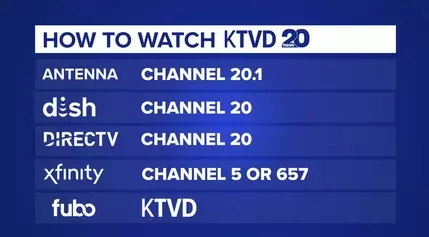
Navigating the world of television can be a daunting task, but KTVD makes it easy for viewers to access its content. Whether you prefer the convenience of cable or satellite, the flexibility of streaming, or the cost-savings of free over-the-air television, KTVD has you covered.For cable and satellite subscribers, KTVD can be found with ease. On Xfinity, the channel is available on channel 5 or 657, while on Dish Network and DirecTV, it can be accessed on channel 20. With a simple check of your TV guide or a voice-activated command, you can quickly tune in to KTVD and enjoy its diverse programming.For those who prefer the freedom of streaming, KTVD has found a home on Fubo TV, a popular subscription service that offers a comprehensive lineup of live and on-demand content. Through Fubo TV, viewers can access all of KTVD's MyNetwork TV programming, including 9NEWS newscasts and select live sports events.But the true beauty of KTVD lies in its availability for free over-the-air viewing. Residents of the Denver metro and surrounding areas can simply use a digital antenna to tune in to channel 20.1 and enjoy KTVD's programming at no additional cost. This option not only saves money but also provides a reliable and high-quality viewing experience, with the added benefit of being able to access the channel's secondary channel, Heros & Icons, on 20.2.Seamless Channel Scanning: Unlocking the Full Potential of KTVD
While accessing KTVD may seem straightforward, the process of setting up your television to receive the channel can be a bit more complex. However, with a few simple steps, you can easily navigate the channel-scanning process and unlock the full potential of KTVD.The first step is to locate the MENU, SETUP, or SETTINGS function on your television remote. From there, you'll need to navigate to the INSTALLATION, SYSTEM, or CHANNELS section, where you'll find the option to AUTO PROGRAM, AUTOSCAN, AUTOTUNING, PROGRAM CHANNELS, or SCAN CHANNELS. Once you've found the appropriate option, simply press ENTER, OK, or SELECT to initiate the scanning process.It's important to note that the specific steps may vary depending on the manufacturer and model of your television, but the general process remains the same. If you're unsure of the exact steps, refer to your television's owner's manual or consult the manufacturer's website for detailed instructions.During the scanning process, your television will automatically search for and program all available channels, including KTVD on channel 20.1. This process can take anywhere from a few minutes to 15-30 minutes, depending on the complexity of your local television landscape. Once the scan is complete, you'll be able to access KTVD and its diverse range of programming with ease.Remember, a strong, unobstructed antenna signal is crucial for optimal KTVD reception. If you're using a rabbit-ears style indoor antenna, you may need to adjust its position to maximize the digital signal. With a little bit of effort, you'll be able to enjoy the full breadth of KTVD's content, from the latest news and sports coverage to the most captivating entertainment offerings.